畫面莫名其妙地重 build 了

Flutter 自帶各式各樣的 Widget,能透過改變 Widget 的參數,讓畫面符合開發者想要的設計。在大部分的時間裏,能有效減低開發者的開發時間。但是如果開發者使用方式不正確的話,往往會造成不預期的結果,今天就來分享一個問題。
舉個例子
假設我們有一個簡單的應用,總共有兩個頁面:第一個頁面會顯示一組隨機繁體中文數字,然後使用者需要記下該數字,並且在第二頁輸入結果。Submit 之後,會在第一個頁面的底部顯示答案是否正確。
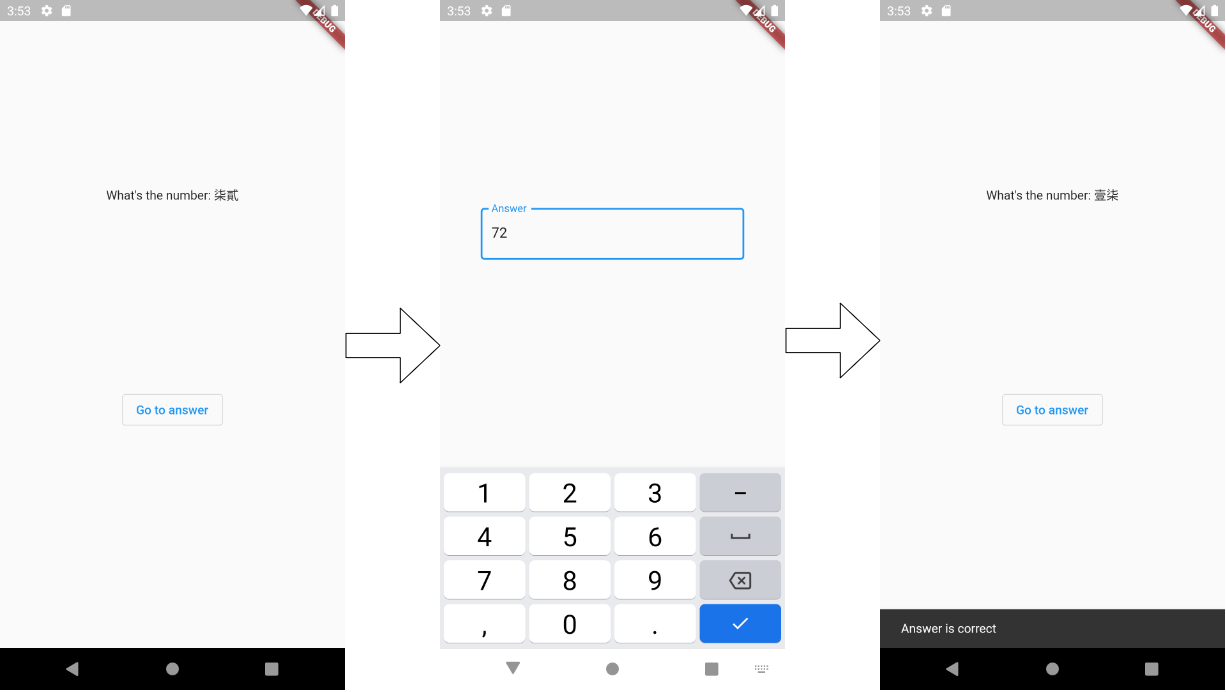
第一個頁面的程式碼
class FirstPage extends StatelessWidget {

  @override
  Widget build(BuildContext context) {
    String randomNumber = _getRandomNumber();
    return Scaffold(
      body: Column(
        children: [
          Container(
            alignment: Alignment.center,
            height: MediaQuery.of(context).size.height * 0.6,
            child: Text(
              "What's the number: ${NumberConvertor.toText(randomNumber)}",
            ),
          ),
          OutlinedButton(
            child: const Text("Go to answer"),
            onPressed: () async {
              var result = await Navigator.of(context).pushNamed("/second");
              ScaffoldMessenger.of(context).showSnackBar(SnackBar(
                content: Text("Answer is ${result == randomNumber ? "correct" : "wrong"}"),
              ));
            },
          ),
        ],
      ),
    );
  }

  String _getRandomNumber() {
    return Random().nextInt(100).toString();
  }
}
第二個頁面的程式碼
class SecondPage extends StatelessWidget {

  @override
  Widget build(BuildContext context) {
    return Scaffold(
      body: Center(
        child: Container(
          alignment: Alignment.center,
          width: 300,
          child: TextFormField(
            keyboardType: TextInputType.number,
            onFieldSubmitted: (text) => Navigator.of(context).pop(text),
            decoration: const InputDecoration(
              border: OutlineInputBorder(),
              label: Text("Answer"),
            ),
          ),
        ),
      ),
    );
  }
}發生了不預期狀況
當使用者在第二個頁面填完答案回到第一頁面時,會發現雖然訊息顯示答案正確,但是原本的題目卻已經變成另外一組了
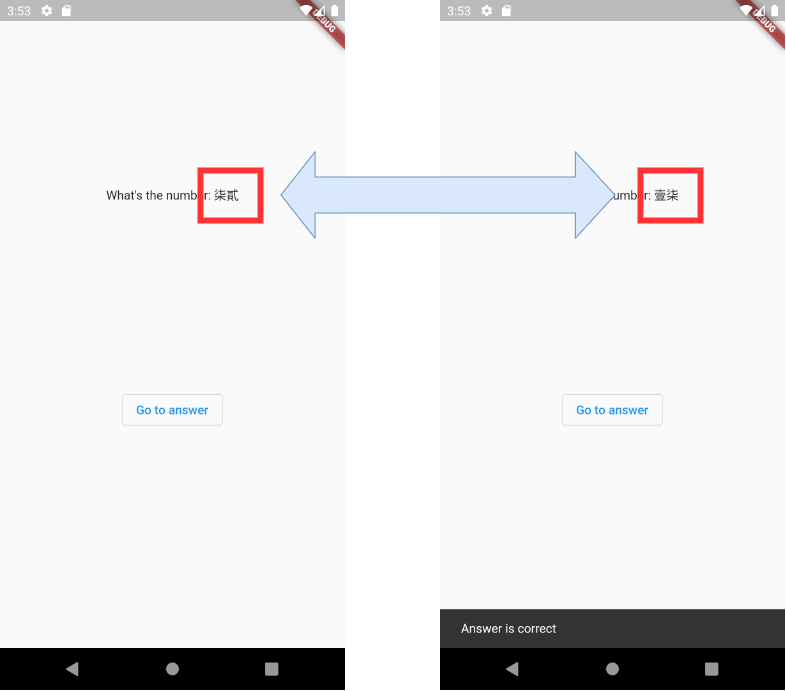
發生了什麼事
如果我們 debug 了一下程式,就會發現一個神奇的狀況:當使用者在第二的頁面點開鍵盤時,第一個頁面就會重新 build 了一次,導致畫面又重新取了一次亂數,新的數字就出現在畫面上。

為什麼麼第二個頁面的動作會影響到第一個頁面呢?讓我們回到第一個頁面的程式碼,仔細觀察與實驗就會發現,是 MediaQuery.of(context) 在搞的鬼。
Container(
  alignment: Alignment.center,
  height: MediaQuery.of(context).size.height * 0.6,
  child: Text(
    "What's the number: ${NumberConvertor.toText(randomNumber)}",
  ),
),
如果我們把 MediaQuery.of(context).size.height * 0.6 置換成固定值。
Container(
  alignment: Alignment.center,
  height: 500,
  child: Text(
    "What's the number: ${NumberConvertor.toText(randomNumber)}",
  ),
),
當輸入答案回來之後,題目還是維持的原來的題目。
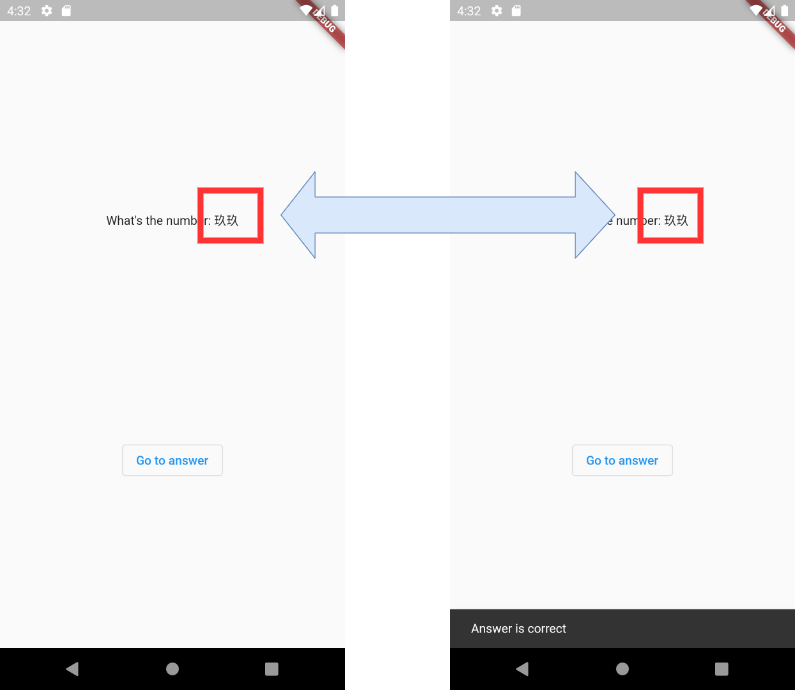
MediaQuery.of(context) 做了什麼?
如果我們查看 MediaQuery.of(context) 的原始碼,會發現其中有段 context.dependOnInheritedWidgetOfExtractType,如果再往裡面查,會發現這不過是 BuildContext 這個介面上的一個方法。
static MediaQueryData of(BuildContext context) {
  assert(context != null);
  assert(debugCheckHasMediaQuery(context));
  return context.dependOnInheritedWidgetOfExactType<MediaQuery>()!.data;
}
實作則需要找到 Element 這個類別。
@override
T? dependOnInheritedWidgetOfExactType<T extends InheritedWidget>({Object? aspect}) {
  assert(_debugCheckStateIsActiveForAncestorLookup());
  final InheritedElement? ancestor = _inheritedWidgets == null ? null : _inheritedWidgets![T];
  if (ancestor != null) {
    return dependOnInheritedElement(ancestor, aspect: aspect) as T;
  }
  _hadUnsatisfiedDependencies = true;
  return null;
}

@override
InheritedWidget dependOnInheritedElement(InheritedElement ancestor, { Object? aspect }) {
  assert(ancestor != null);
  _dependencies ??= HashSet<InheritedElement>();
  _dependencies!.add(ancestor);
  ancestor.updateDependencies(this, aspect);
  return ancestor.widget;
}
當執行 dependOnInheritedWidgetOfExactType 時,會把 MediaQuery 的 InheritedElement 塞到 Element 身上的 _dependencies 中,同時也會呼叫 ancestor.updateDependencies,把自己也塞到 InheritedElement 的 _dependents 中。
當 InheritedElement 發生改變時,就會呼叫身上的 notifyClients,從而更新所有的 dependents。
@override
void notifyClients(InheritedWidget oldWidget) {
  assert(_debugCheckOwnerBuildTargetExists('notifyClients'));
  for (final Element dependent in _dependents.keys) {
    assert(() {
      // check that it really is our descendant
      Element? ancestor = dependent._parent;
      while (ancestor != this && ancestor != null)
        ancestor = ancestor._parent;
      return ancestor == this;
    }());
    // check that it really depends on us
    assert(dependent._dependencies!.contains(this));
    notifyDependent(oldWidget, dependent);
  }
}
回到例子上,也就是當第一個頁面呼叫 MediaQuery.of(context) 時,就已經向 MediaQuery 註冊了一個觀察者,當 MediaQuery 因為鍵盤的出現導致畫面高度發生改變時,第一頁面也就跟著一起重 build 了。
如何解決問題
回到我們的問題上,如何讓第一個頁面不要重 build 呢?以上面這個例子來看,目的只是想依照固定高度比例來設計畫面,可以簡單的使用 Column + Expanded 解決。
小結
我自己覺得 Flutter 把 Widget 設計得十分方便,讓使用者可以用比較少的程式碼就完成功能,但是其中比較困難的就是許多細節被隱藏在框架之中。像是一般情況下,我們幾乎不會碰到 InheritedWidget,更多的是直接使用他的衍生類別或 Wrapper,在這種情況下,我們就很難知道這行程式碼究竟會帶來什麼影響,進而造成一些不預期的狀況。除了明白如何使用框架,有時也需要深入理解框架做了什麼,才能更有效地使用框架。